
Run a feature test in your project ->
How does feature-based testing work in BYOB? #
BYOB feature mode tests one risky SvelteKit workflow deeply while full-site mode sweeps everything for release confidence. Scope: login, checkout, onboarding, or payment flows where failure costs revenue; constraint: name the trigger, expected path, and fallback in the feature name or the report stays vague. The run template is 5 inputs: feature name, success condition, edge condition, visual pass flag, unit flag — then patch the slice and rerun feature mode first.
A full physical examines everything and finds nothing in particular. A specialist appointment examines one knee and finds the torn ligament. BYOB testing offers both postures. Full-site mode sweeps the whole app for release confidence. Feature mode goes deep on one workflow where risk actually lives.
If your highest risk is login, checkout, onboarding, or payment flow, feature mode usually gives better signal faster. This guide shows how to scope it, run it, and read it.
TLDR #
- Use feature mode for one critical flow at a time.
- Write a specific feature name before run.
- Include browser checks for UI-heavy workflows.
- Use history to compare regressions across sessions.
How do you pick the right scope for a test run? #
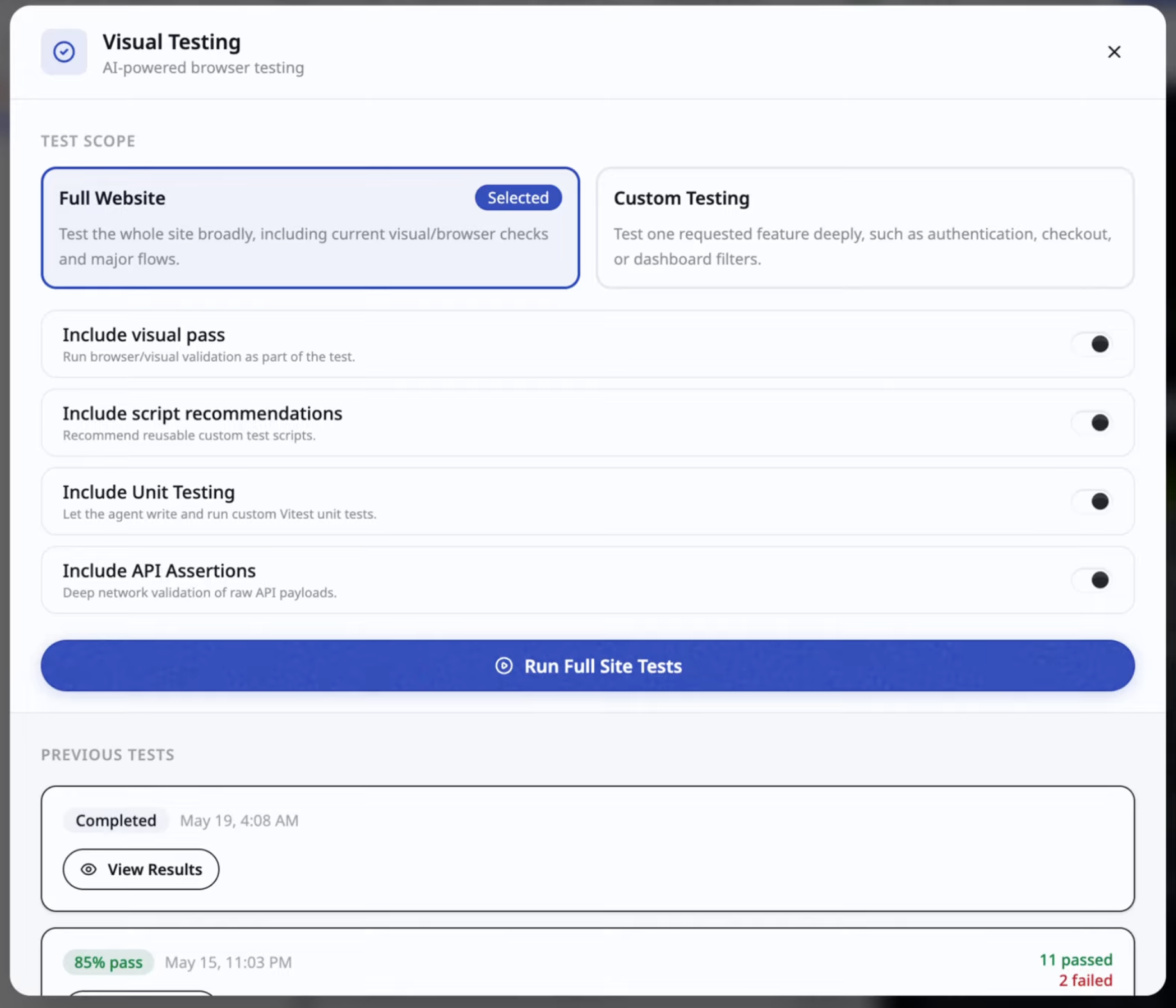
The decision takes five seconds and saves hours. Shared primitives changed, like auth helpers or layout components that every route imports? Sweep everything. One flow changed, like coupon handling at checkout? Aim the instrument at that flow and spend the whole budget there.
Why does feature mode exist? #
Full-site tests are broad but can bury localized failures in noise. Twenty green routes make one red checkout easy to skim past. Feature mode narrows context and spends test budget where risk concentrates, which buys debugging speed in three concrete ways: less time parsing irrelevant checks, clearer failure attribution, and faster rerun loops.
This mirrors a distinction Google has used for over a decade. In their classic test sizes post, small tests stay hermetic and fast while large tests span machines and networks with flakiness to match. Feature mode sits in the productive middle: broader than a unit test, narrower than an end-to-end sweep, scoped to the workflow users would riot over if it broke.
How do you define feature scope properly? #
Bad scope examples read like labels.
authdashboard
Better scope examples read like contracts.
magic-link login with expired token handlingcheckout with coupon plus failed payment recovery
Precision in scope creates precision in report output. The test agent can only verify what you named, so name the trigger, the expected path, and the failure fallback path. Think of the feature name as the spec. Vague spec, vague verdict.
Feature name should include trigger, expected path, and failure fallback path.
What is the suggested test run template? #
Use this input template for consistent runs.
- Feature name.
- Expected success condition.
- Known edge condition.
- Include visual pass yes or no.
- Include unit generation yes or no.
Consistency compounds. When every run carries the same shape, runs become comparable, and comparability is what turns a pile of reports into regression memory.
How does full-site compare with feature-based testing? #
| Dimension | Full-site | Feature-based |
|---|---|---|
| Breadth | High | Focused |
| Depth per flow | Medium | High |
| Runtime | Longer | Usually shorter |
| Best use | Pre-release sweep | Regression and critical path validation |
Neither replaces the other. Full-site answers "did anything break anywhere." Feature mode answers "does the thing that pays us still work." Ship cadence needs both answers on different schedules.
How do you read a feature test report? #
Feature reports should answer three questions.
- Does the primary path pass?
- Do edge conditions fail safely?
- Did performance or rendering regress?
If one fails, patch only the impacted slice and rerun feature mode first. Resist the urge to rewrite the neighborhood. The report pointed at one room for a reason.
Under the hood, browser checks in this industry rest on two foundations worth knowing. Playwright drives Chromium, Firefox, and WebKit through one API with auto-waiting assertions and isolated contexts per test, as described in the Playwright docs. Beneath tools like it sits the W3C WebDriver standard, the wire protocol for remote browser control covering sessions, element location, interaction, and screenshots. BYOB's extension-driven checks live in that same tradition: a real browser, real clicks, real verdicts.
How do you use history as regression memory? #
BYOB stores prior runs so you can compare trends.
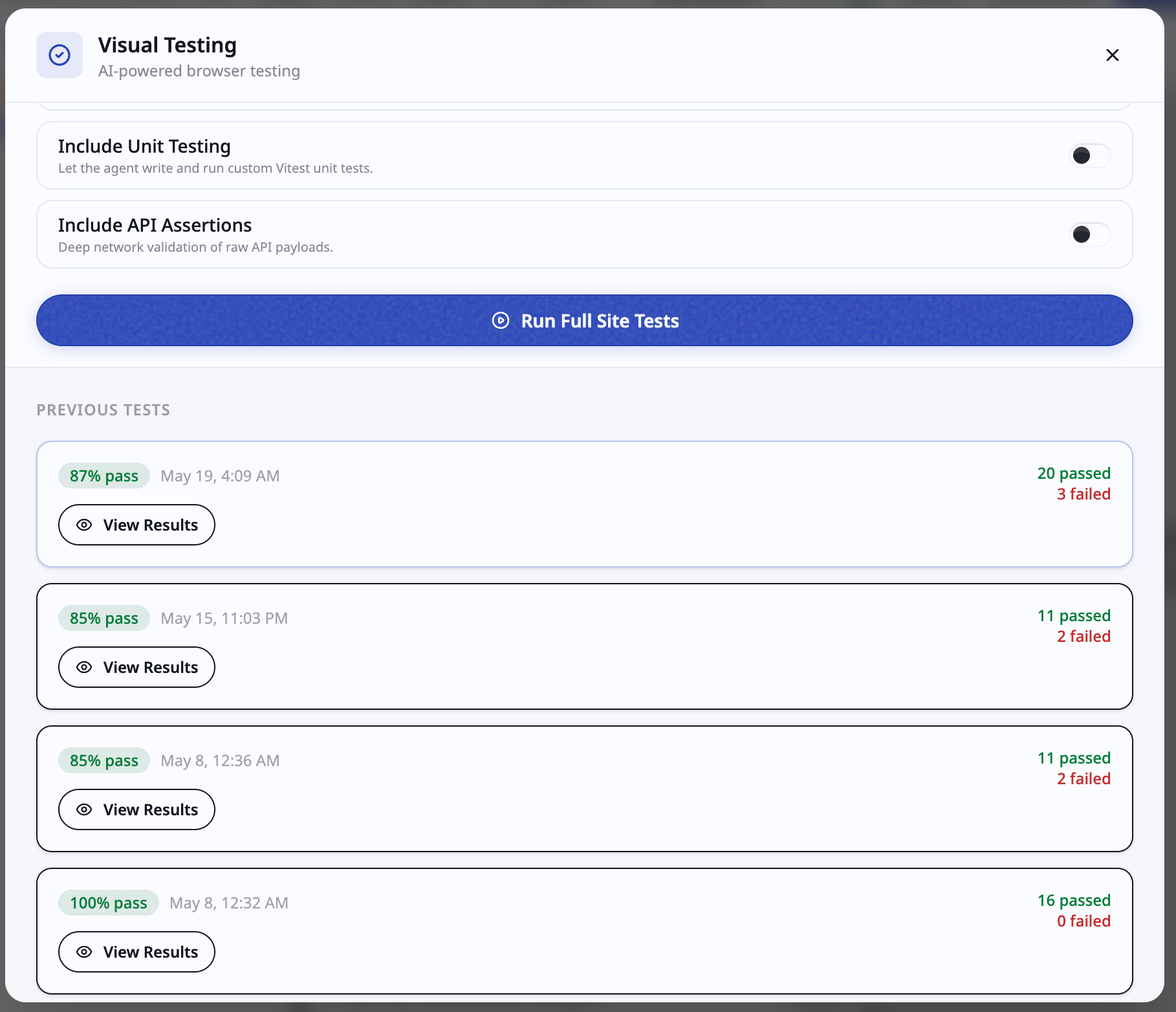
When a flow passed yesterday and fails today, compare the commit range and isolate the smallest change set. History turns "it broke" into "it broke between these two commits," which is a vastly cheaper sentence to act on. For release-critical features, keep three pointers in your sprint notes: last passing report, latest failing report, and the patch commit that restored green. Future incident reviews will thank present you.
What release rhythm should you follow? #
- During development, run feature mode on each risky change.
- Before release, run one full-site sweep.
- After release hotfix, rerun feature mode on the patched flow.
This gives strong confidence without bloating test cycle time. The pattern matches the MCP-connected testing flow too, where route binding keeps the browser aimed at the correct runtime so failures mean product issues rather than infrastructure noise. Reliable plumbing plus narrow scope equals reports you can trust at midnight before launch.
What are the common mistakes? #
Mistake 1: using feature mode with vague names #
Vague scope creates vague checks and weaker signal. "Test checkout" verifies nothing in particular and passes on vibes.
Mistake 2: skipping edge conditions #
Most regressions appear in fallback or retry paths, not the happy path. Expired tokens, declined cards, flaky networks, timed-out webhooks. Test the rain as well as the sunshine.
Mistake 3: treating one pass as permanent proof #
Use repeated runs across versions. Trend matters more than one green report. A flow that passes ten consecutive runs across five versions is proven. A flow that passed once last Tuesday is rumored.
How do you triage after a failed feature run? #
- classify failure as product logic, UI behavior, or setup bridge issue.
- isolate smallest related change since last passing run.
- patch that scope only.
- rerun same feature test before broad sweeps.
This keeps iteration tight and avoids large speculative rewrites. The most expensive response to a red report is rewriting three files on a hunch. The cheapest is reading the report literally and changing one thing.
Try it: Deploy checklist
What is the test artifact retention practice? #
For release-critical features, keep these records in sprint notes.
- last passing report ID
- latest failing report ID
- patch commit that restored pass
This audit trail helps during incident review and release retrospectives. It also settles the eternal argument about whether a flow "was working before" with timestamps instead of memories.
What are the trade-offs? #
The post recommends feature mode during development, one full site sweep before release, precise feature names with trigger plus path plus fallback, and history comparison across runs. That follows the Playwright, Google test sizes, WebDriver, and MCP sources cited above.
| Where the recommended path wins | Where it loses |
|---|---|
| Deep signal on the risky flow without paying for a full sweep each edit | Narrow scope misses cross page breaks that only a full sweep catches |
| History comparison isolates the smallest change set behind a regression | Comparison only works when names stay stable across runs |
| Rerun after every change to the feature keeps confidence current | Naming plus edge case writing adds minutes to every test setup |
Pick full site sweeps only, without feature runs, when the app has few flows and each release touches nearly every route anyway.
What we learned building this? #
We run feature checks from the same workspace where the project lives, so a failing checkout flow points at the flow instead of the setup. The visual testing docs show the active test view inside the editor, which is why reports read like product feedback instead of log noise. Scoped runs earn trust because the route binding keeps every check on the right runtime.
Who this is for (and who should skip it)? #
This guide helps builders who own a risky flow like checkout or login and want proof it works before release. If you ship behind preview links and triage failures yourself, the run template and triage order above map directly to your week.
Skip the deep pass if your site is a fresh landing page with no forms or payments. A full site sweep plus your own eyes on preview will cover you, and you can return here when a feature starts handling money or identity.
- Best for developers proving checkout or login works before release.
- Best for startups owning one risky flow with limited QA time.
- Best for small teams using preview links and report history as regression notes.
FAQ #
Does feature mode replace full-site mode? #
No. It complements it. Depth during development, breadth before release, depth again after hotfixes.
Should I always enable unit test generation? #
Enable it when logic or data transforms changed. For pure copy edits, usually no. Generated unit tests for a headline change are ceremony without content.
Can I run feature mode on free plan? #
Plan limits apply. Paid tiers unlock broader testing usage, and the AI testing agent with both modes is a paid-plan feature per byob.studio.
How often should I rerun same feature test? #
Rerun after every meaningful change to that feature and before release. Unchanged features do not need ritual reruns, changed ones do.
Open your project and run focused tests ->
Pick your riskiest flow today, write its name as a contract, and run feature mode against it. Whatever comes back red is the most useful bug report you will read this week.