The Challenge of Live AI Rendering #
When we set out to build BYOB's OnePage Studio, our primary goal was speed and transparency. Waiting 60 seconds for an AI to generate a website in a black box is a terrible user experience. We wanted users to see the page assemble itself in real-time, matching the speed of thought.
However, streaming raw HTML from an LLM and rendering it directly into the DOM presents several massive engineering challenges that go far beyond standard text generation:
- Broken DOMs: Streaming HTML means you are constantly dealing with unclosed tags and invalid DOM structures. A
<div class="hero">might be sent by the server, but the closing</div>won't arrive for another two seconds. - Security: You cannot simply
innerHTMLan AI's response directly into your SvelteKit application. Doing so invites cross-site scripting (XSS) vulnerabilities if the LLM hallucinates an<img onerror="...">payload. - Interactivity: How do you allow a user to click and interact with elements inside this partially rendered, untrusted sandbox while maintaining state synchronization?
Here is an inside look at the Progressive Semantic Blueprint architecture we engineered to solve these problems.
The Streaming Sandbox and Bootstrap Payload #
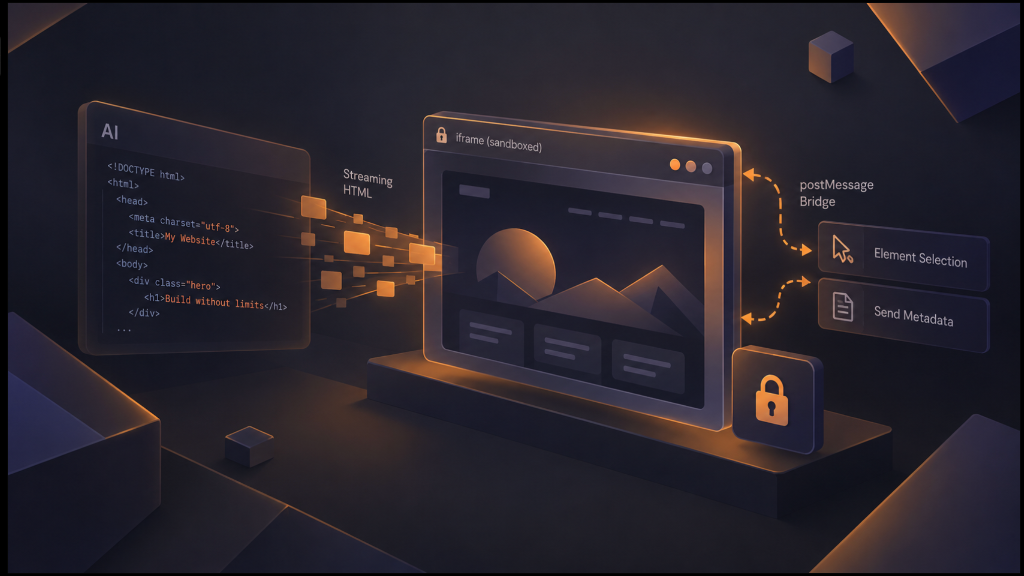
To guarantee security, the generated page is isolated entirely inside an <iframe> with strict sandbox="allow-scripts allow-same-origin" attributes. This ensures that any malicious JavaScript hallucinated by the LLM cannot access the parent application's session data, local storage, or API tokens.
But we still needed a way to push the streaming HTML into the iframe at 60 frames per second. Rather than reloading the iframe source constantly (which causes unacceptable white flashes and destroys scroll position), we developed a custom lightweight bootstrap script.
Before the AI even begins generating from AIR_URL or PRIM_URL, we inject a tiny <script> payload via srcdoc into the iframe. This script sets up an event listener waiting for postMessage events from the parent application.
As the LLM streams the response, the SvelteKit parent application batches the chunks and sends them across the postMessage boundary. The iframe receives the partial HTML, safely parses it using DOMParser, and seamlessly injects it into the document body.
// Inside the iframe bootstrap script
window.addEventListener('message', e => {
    if (e.data?.type === 'ONEPAGE_STREAM_UPDATE') {
        // Safe DOM parsing of incomplete HTML structures
        const doc = new DOMParser().parseFromString(e.data.html, 'text/html');
        if (doc.body) {
            document.body.innerHTML = doc.body.innerHTML;
        }
    }
});
Because browsers are incredibly resilient at auto-closing tags during DOMParser operations, this creates a "magic" effect where the website smoothly paints itself down the screen, rendering structural CSS and layout rules immediately even while the AI is still "thinking" about the footer.
Bridging the Gap: The Visual Element Picker #
One of the standout features of OnePage Studio is the ability to point and click to edit any generated element. But remember: the preview is trapped inside a secure iframe, completely isolated from the parent SvelteKit application's state.
To accomplish this bidirectional communication, we inject a secondary script into the iframe specifically for the Picker tool.
When the user clicks "Edit" in the main UI, the parent application posts a ONEPAGE_PICKER_ON message. The iframe activates a hover state listener that dynamically injects a glowing CSS outline as the mouse moves over DOM nodes.
When the user clicks an element, the script calculates a highly specific CSS path (e.g., section:nth-of-type(2) > div > h1:first-child) and uses getBoundingClientRect() to grab its exact coordinates on the screen. It packages this spatial data, along with the element's inner HTML snippet, and blasts it back to the parent app via postMessage.
The SvelteKit parent catches this message and renders a Svelte 5 $state-driven floating UI exactly over those absolute coordinates, allowing the user to seamlessly edit the text. The parent UI feels completely native, but it is interacting with a ghost element inside the sandbox.
Overcoming Mobile Safari Quirks #
Building this architecture was relatively smooth on desktop, but mobile iOS devices presented a severe layout challenge. During testing, the mobile Studio UI layout had persistent scrolling and clicking issues. The iframe touch events were being swallowed entirely, making it impossible to scroll the live preview on an iPhone.
This was traced back to a notorious iOS Safari quirk regarding nested overflow-hidden containers and absolute positioning on iframes. Safari attempts to expand iframes to fit their content, breaking 100vh layouts when contained within absolute bounds.
To fix this, we had to completely reconstruct the iframe wrapper. We removed the restrictive absolute positioning and adopted a robust, native-flow flex layout for the iframe container (using a specialized onepage-preview-frame class and hardware-accelerated touch-action: pan-x pan-y).
.onepage-preview-frame {
    display: flex;
    flex-direction: column;
    height: 100%;
    /* Forces iOS Safari to respect boundary scrolling */
    -webkit-overflow-scrolling: touch;
    touch-action: pan-x pan-y;
}
By ensuring the iframe handles its own scrolling and touch events within the standard document flow, we bypassed Safari's buggy behavior entirely, resulting in buttery smooth scrolling on all mobile platforms.
Surgical AI Edits via DOM Parsing #
Finally, when a user asks the AI to rewrite a specific section via chat (e.g., "Make this button bigger and red"), regenerating the entire page would be wasteful, slow, and expensive.
Instead, the AI responds using a targeted semantic protocol governed by the PRIM_URL endpoint:
```edit
SELECTOR: section > button
HTML:
<button class="btn btn-lg bg-red-600 text-white">Bigger Button</button>
Our Svelte client intercepts this block, parses the current master HTML string into a virtual DOM tree, locates the target element via the CSS selector, and surgically swaps the node. It then serializes the tree back to a string and triggers the streaming update cycle. This results in instant, localized updates without disrupting the rest of the generated layout.
By treating the LLM not just as a text generator, but as a component-aware semantic engine, and by leveraging Svelte 5's new $state runes for lightning-fast reactivity, we've created a builder that is fundamentally faster and more intuitive than anything that came before it.