The Fastest Path from Idea to Internet #
We built BYOB with a simple mission: let anyone build real, scalable web applications using plain English. Over the last year, we've seen incredible multi-page SaaS apps, e-commerce stores, and internal tools built on our platform.
But as we watched how people used BYOB, we noticed a distinct pattern. A massive percentage of users didn't want to start with a complex web app wired to a database. You just wanted a beautiful, high-converting landing page to validate your idea, launch your agency, or collect waitlist emails for your next startup.
You wanted it fast, you wanted it visually stunning, and you didn't want to deal with complex backend architecture just to get a single page online.
Today, we're thrilled to introduce BYOB OnePage Studio — a lightning-fast, highly optimized environment dedicated entirely to building single-page websites.
Watch It Build in Real-Time #
Traditional website builders make you drag and drop for hours, fiddling with padding and margins until things look right. Standard AI builders take a different, but equally frustrating approach: they make you wait staring at a loading spinner for three minutes, only to present a finished product that completely misses the mark.
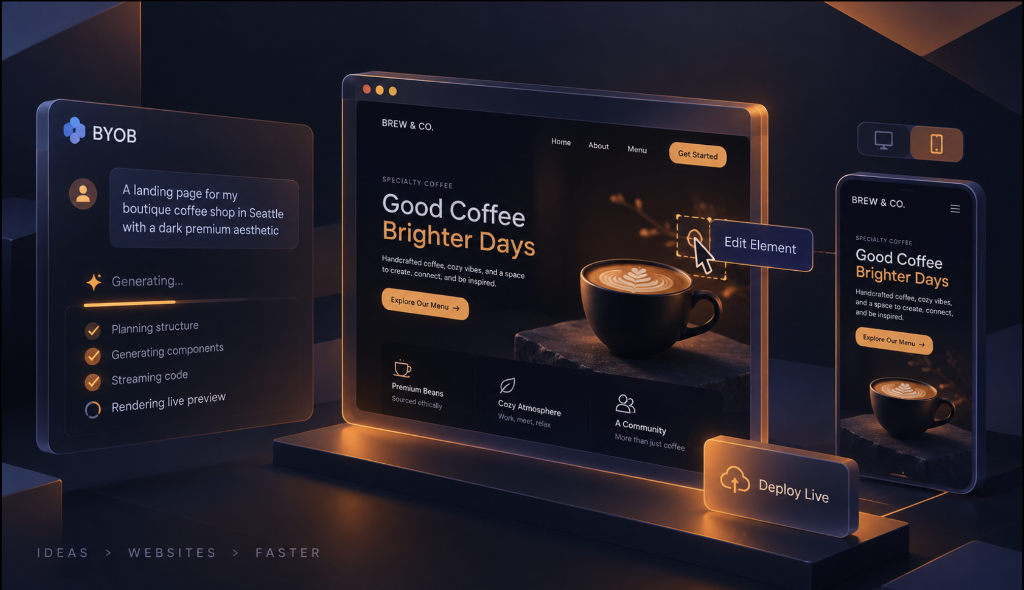
OnePage Studio uses a fundamentally different approach. As soon as you type your prompt (e.g., "A landing page for my boutique coffee shop in Seattle with a dark premium aesthetic"), the AI starts streaming the code. We render this code live directly into the canvas.
You literally watch your website assemble itself piece by piece, second by second. This means if the AI starts generating a layout you don't like, you don't have to wait 60 seconds to stop it. You can interrupt, redirect, and refine the design instantly.
The Visual Element Picker: Precision Editing #
While chat interfaces are incredible for broad strokes ("make the design darker", "add a pricing section with three tiers"), they can be tedious for tiny, specific tweaks. Asking an AI to "change the text on the second button in the third row" is inefficient.
That's why we built the Element Picker. Click the target icon, hover over your live preview, and click any element on the page. A floating menu appears instantly, allowing you to:
- Edit Text Directly: Just type in the textarea and watch the preview update instantly on the page without waiting for the AI to rewrite code.
- Micro-Prompting: Ask the AI to change just that specific component ("make this button larger and red" or "rewrite this paragraph to be more persuasive") without regenerating the entire layout.
This hybrid approach—AI for the heavy lifting and structural design, coupled with direct visual manipulation for the final polish—gives you unprecedented control over your generated designs.
Uncompromised Mobile-First Experience #
Over 60% of web traffic is mobile, so your builder should be too. Many "AI builders" are virtually impossible to use on a smartphone due to cramped interfaces and broken scroll behaviors.
We completely engineered the OnePage Studio layout to work flawlessly on your phone. We solved notorious iOS Safari scrolling quirks to ensure that your live preview handles touch events smoothly. You can toggle between the chat interface and the live preview with a simple tap, and use the device toggle to see exactly how your generated page looks on desktop versus mobile.
Building a website while waiting for your coffee order is now a reality.
Economics That Make Sense #
Just like our core platform, OnePage Studio respects your wallet. AI generation is metered using BYOB credits, meaning you only pay for the heavy lifting.
However, manual edits via the Element Picker cost no credits. Tiny fixes like tweaking a headline or changing a color value are entirely free when you make them yourself. You can iterate and perfect your site's copy for hours without burning through your balance.
From One Page to Full Stack #
The best part about OnePage Studio? It's not a toy builder that locks you into a dead-end static site.
Every page generated is a real, standards-compliant SvelteKit application under the hood, styled with Tailwind CSS. When your coffee shop starts taking online orders, or your waitlist grows into a fully fledged SaaS product, you don't have to start over.
Click the Convert to Full Stack button, and BYOB will seamlessly upgrade your one-page landing site into a full BYOB Workspace project. From there, you can add multiple routes, connect a Cloudflare D1 database, implement authentication, and build out complex backend logic.
Try it out today at byob.studio/onepage and see how fast you can build.